
“7 Wonders of the Ancient World” is a puzzle game which recreates very well the ancient world, where you have to build the seven wonders of the world. It doesn’t sound simple, right? So, how do you do that? Let’s take a look at the game.
The objective of “7 Wonders of the Ancient World” is to create matches of three in a row (or more) tiles, by swapping the correct tiles on the board. To do that, click on the tiles you want to swap. When you create the match, those tiles disappear and the tiles above them fall down. The holes created are automatically occupied by new tiles. If a new match occurs, a chain reaction is triggered and you’ll get points much faster. As you progress on the game, you’ll be progressing in your journey from the Giza pyramid to the Hanging gardens of Babylon.
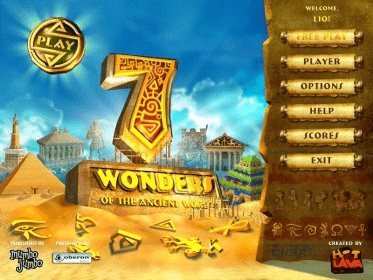
When you first enter the game, you’ll be asked for a player name and see the welcome screen with the following options on it:
- Player: after you create one or more players, they’ll be saved. When you enter into this submenu, you’ll be asked for a name as a new player. It’s possible to have a list of different players and record their performance. This way, you can play home tournaments with family and friends.
- Play: this option leads you to the first level of the game. You’ll be previously seeing the instructions for the game, unless you’ve seen it before and deactivated this option.
- Free Play: this is another mode for playing the game. Here, you don’t have to pass levels, but only try to get the most points you can. In order to access this mode, you have to pass the first level in the regular mode.
- Options: this is the menu from which you can set some game options, like sounds volume, music volume, full screen, and tips on/off.
- Scores: to see the players records.
- Help: it displays an animated comic-styled help.
- Exit: no further explanation required.
When you’re playing the game, you can always click on the Menu button to access to a pop-up menu with these options:
- Options: to open the options menu commented before.
- Help: to open the help.
- Exit: to close the application.
- Resume: you go back to the game.
You can try this game for 60 minutes before you buy the licensed version. If you like it, you can buy this game for only 19.95 dollars, right from the Oberon Media Game Center, on the Web.
About the system requirements, is not that big computer that you need to run this game. Take a look to the list:
• Windows XP/Vista
• Pentium 800MHz
• 128MB RAM
• DirectX 8 or later
• Direct3D 8 compatible 16 or 32-bit Video Card with 16MB VRAM (64MB recommended)
• DirectSound compatible Sound Card
• 60 MB free space





Comments